
CaseView: the discovery tablet built for jails
CaseView Tablets put your client’s complete discovery in their hands inside the jail, including documents, video, audio, and cell phone data. Each tablet is protected by your client’s own unique PIN and stays with them for the life of the case in that facility.
Secure, searchable, and attorney-client privileged. Approved in 36 jails and detention facilities.
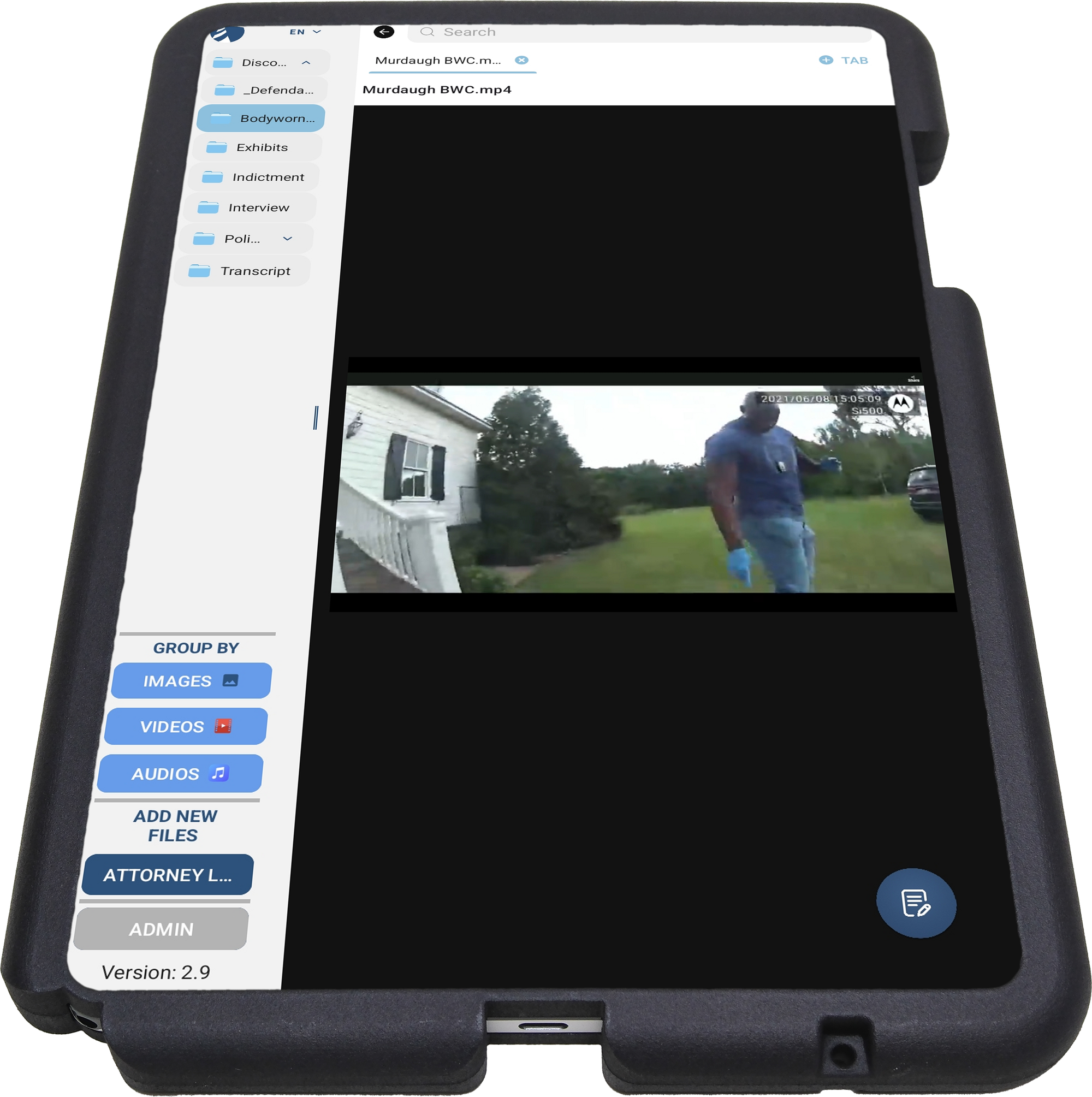
— A full-featured evidence review app
Built for defendants to review discovery, understand the evidence, and work with their defense team.
Every CaseView Tablet gives your client the tools to take an active part in their own defense:
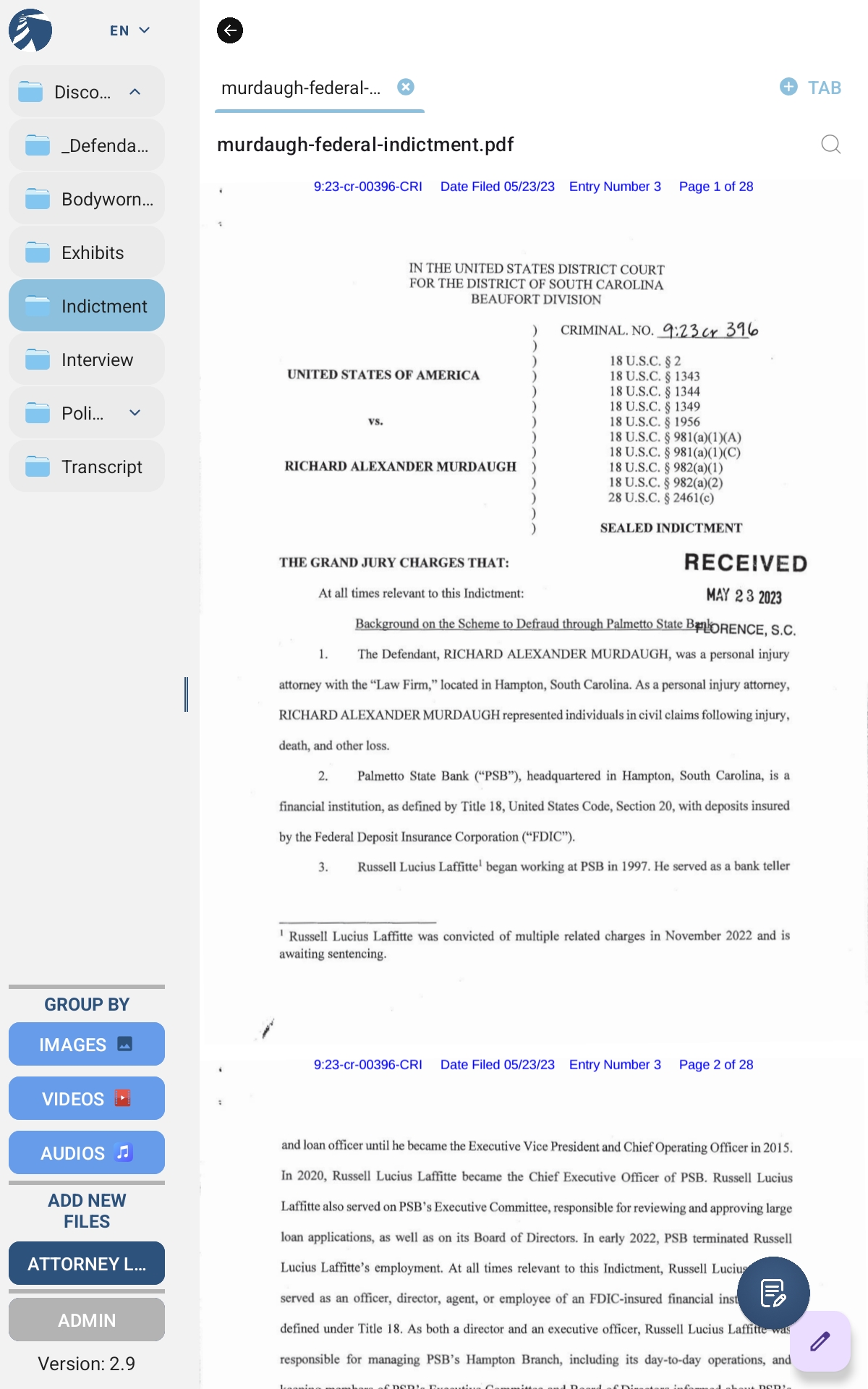

Organized Digital Discovery
Folders organize voluminous discovery. Users can create their own new folders and organize evidence.

Common File Types Viewable
PDFs, Microsoft Office, HTML, text, images, video, audio

Searchable Database
Case file is fully indexed and searchable.

PIN-Protected Access
Only your client can open their files.
Defendant Notes
Notes tied to case files, ready for attorney visits or trial.
— how it works
Getting started is easier than you think.
01
Jail approval
CaseView Tablets are approved in 36 detention facilities, and new facilities come online regularly.
If your client’s jail isn’t approved yet, just ask.
When an attorney requests a new facility, CDM works directly with jail administration on approval.
02
Load the discovery
Discovery is loaded onto the tablet by CDM or by the attorney directly.
New discovery can be added at any time, even while the tablet is at the jail. Client notes can be saved off the tablet for preservation.
03
Deliver to your client
The tablet is delivered to the jail and stays with your client for the duration of the case.
Jail staff secures and recharges tablets when not in use. Most jails allow tablets in common areas, visiting rooms, and court appearances.
04
Return when done
When the case ends or the tablet is no longer needed, simply return it to CDM (postage paid).
Tablets are wiped of all data.
No long-term commitments, no complicated off-boarding.
— built for attorneys and jails
Better for your client, your practice, and the jail.

Fewer visits. More trust.
CaseView Tablets give defendants unlimited time to review their own case file, so your visits become focused, productive conversations.

No paper. No contraband.
CaseView replaces printed discovery entirely. There’s nothing to inspect, drug test, photocopy, or store, and no paperwork for other inmates to read.

A client who believes in their own defense.
When defendants can read and search the actual evidence against them, they understand their case and are better prepared to make hard choices.
— For jail administrators
Less paper, less contraband, less work for your staff.
CaseView Tablets replace printed discovery in housing units. Drug-soaked paper has become one of the most common ways contraband enters jails, and every page of printed discovery is another page your staff must inspect. With CaseView, there’s nothing to inspect, drug test, or store.
CDM handles approval, security review, and device logistics with jail administration. Each tablet holds one defendant’s discovery and is protected by that defendant’s unique PIN, so discovery stays private even in shared housing.
No cost to the facility for any equipment.
— leasing & funding
Designed to work within indigent defense budgets.
Each CaseView Tablet is leased to one defendant and billed to that case, so it fits indigent defense funding and pre-authorization. There are no tablet minimums and no long-term commitments.
Return the tablet at any time. Costs are capped to fit within authorized budgets.
CDM works with state public defenders, federal defenders, CJA panel attorneys, and privately retained counsel. Contact us to discuss lease pricing for your office.
— Jail approvals
Approved facilities
CaseView Tablets are approved in the following jails and detention facilities. Don’t see your client’s facility? Contact us, and we’ll work with jail administration to bring it online.
Oregon
- Benton County
- Clackamas County
- Clatsop County
- Columbia County
- Curry County
- Deschutes County
- Douglas County
- Grant County
- Harney County
- Jackson County
- Jefferson County
- Josephine County
- Lane County
- Lincoln County
- Linn County
- Malheur County
- Marion County
- Multnomah County Detention Center
- Multnomah County Inverness Jail
- NORCOR (Northern Oregon Regional Correctional Facility)
- Parrott Creek Youth Facility (Clackamas County)
- Polk County
- Umatilla County
- U.S. Marshals Service (Portland)
- Wasco County
- Washington County
- Yamhill County
California
- California Medical Facility (Vacaville)
- Contra Costa County
- Lerdo Detention Facility (Kern County)
- Santa Clara County Elmwood Correctional Facility
- Santa Clara County Main Jail
- Santa Rita Jail (Alameda County)
- Taft Community Correctional Facility (Kern County)
Washington
- Pierce County
Utah
- Weber County
CaseView questions
— For attorneys
How do I get a CaseView Tablet for my client?
Contact CDM to request a tablet and discuss facility approval.
The tablet is shipped to your office or directly to the facility, and you can load the discovery yourself. If the discovery needs redaction under state law or a protective order, CDM can redact and load it for you. Once the facility approves access, staff issue the tablet to your client.
How much does it cost, and who pays?
Defense counsel or indigent services funds each tablet, billed to the case either monthly or once per case. Costs are capped to fit within authorized budgets. The facility pays nothing, and all charging hardware is provided.
How much discovery can one tablet hold?
Up to 2 TB, including documents, photos, audio, and video. That’s enough for nearly all cases, even with large amounts of media.
What file types does CaseView open?
PDF, Word, Excel, PowerPoint, HTML, text, images, video, audio, and other common file types. Your client can run full keyword and filename searches across every file.
Can new discovery be added after the tablet is delivered?
Yes. Authorized defense staff can add, remove, or reorganize files at the office or on-site at the facility, so supplemental productions never wait.
Does CaseView work with protective orders?
Yes. The tablet stays in facility custody and is PIN-locked to one defendant and one case, with no network access, no external storage, and encrypted data. CDM can also redact discovery to comply with your protective order.
Can my client take notes?
Yes, where the facility allows it. Clients can take notes linked directly to discovery files, which makes attorney meetings faster and more focused. Each facility decides whether notes are turned on.
What happens when the case ends or my client transfers?
Retrieve the tablet and return it to CDM. There are no long-term commitments.
— Security
Who can see my client’s discovery?
Only your client and their defense team. Each tablet is PIN-locked to one defendant and one case. All data is encrypted to the AES-256 standard, and the memory card is bound to its tablet, so it’s unreadable in any other device.
Can the tablet connect to the internet or other devices?
No. Wi-Fi, Bluetooth, NFC, and tablet-to-tablet sharing are permanently disabled. The tablet is locked to the discovery review app with all settings locked, and file transfers require an attorney password.
— For jails
What does CaseView cost the jail?
Nothing. The defense funds every tablet, and CDM provides all charging hardware.
How do jails manage the tablets?
Each facility sets its own policies for checkout, usage locations, and supervision. Every tablet is physically tagged and assigned to one inmate, and it’s recharged with the provided hardware when not in use.
Is the tablet safe to have in a housing unit?
Yes. Rip-proof, shatter-proof security cases are available with tamper-resistant screws, and the display glass breaks into small, dull fragments. External speakers are disabled, so audio plays through headphones only for privacy.
— no commitment required
See CaseView in action.
Request a demonstration and lease pricing for your office. No minimums, no long-term commitments, no obligation. Just an honest conversation about whether CaseView is the right fit for your clients.